
A smart city is not defined only by connected traffic lights or digital monitoring platforms. People and infrastructure of the city should interact well on a day-to-day basis. Thus, for a request device at pedestrian crossings, it is important that it is easy to use, conspicuous, easily accessible, and reliable in different weather conditions. A contemporary PedSense Push Button meets all these requirements as it integrates touch-free activation with visual, auditory, and tactile response. Instead of treating the push button as a simple switch, this approach makes pedestrian interaction part of a more responsive traffic environment.
For city authorities and traffic-system integrators, the value of such equipment depends on how well it fits the complete crossing system. Factors such as activation distance, feedback clarity, power consumption, weather protection, and user accessibility all affect practical deployment. These characteristics help explain why this type of pedestrian interface can support smart-city infrastructure.
1. What Contactless Features Make PedSense Push Button Smart?
LED and Audio Feedback for Clear Interaction
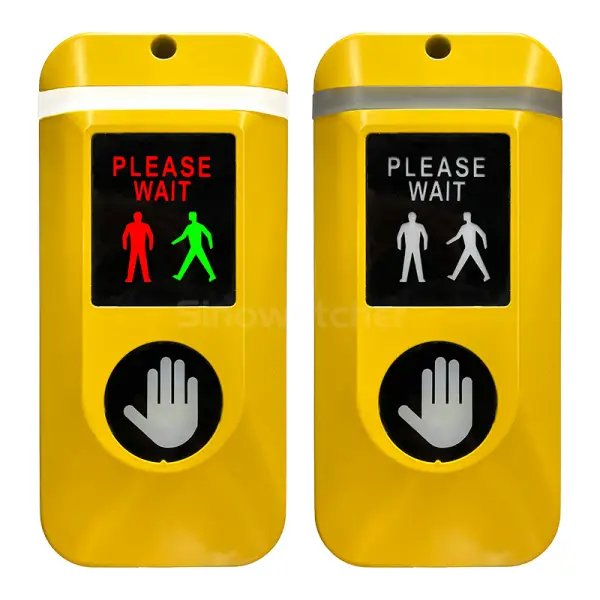
A pedestrian needs to know whether a crossing request has been recognized. The PedSense Push Button combines LED indication with acoustic guidance to provide confirmation and information related to crossing phases. Visual feedback can help users who can see the device, while audio guidance provides another communication channel when visual attention is limited.
This multi-channel approach is important because a smart crossing should not rely on a single signal. A clear LED indicator can show that a request has been registered, while acoustic signals can correspond with pedestrian signal status. When these functions are coordinated with the traffic controller, the interface becomes more informative without requiring the user to interpret complex instructions.
Touch-Free Activation for Pedestrian Crossings
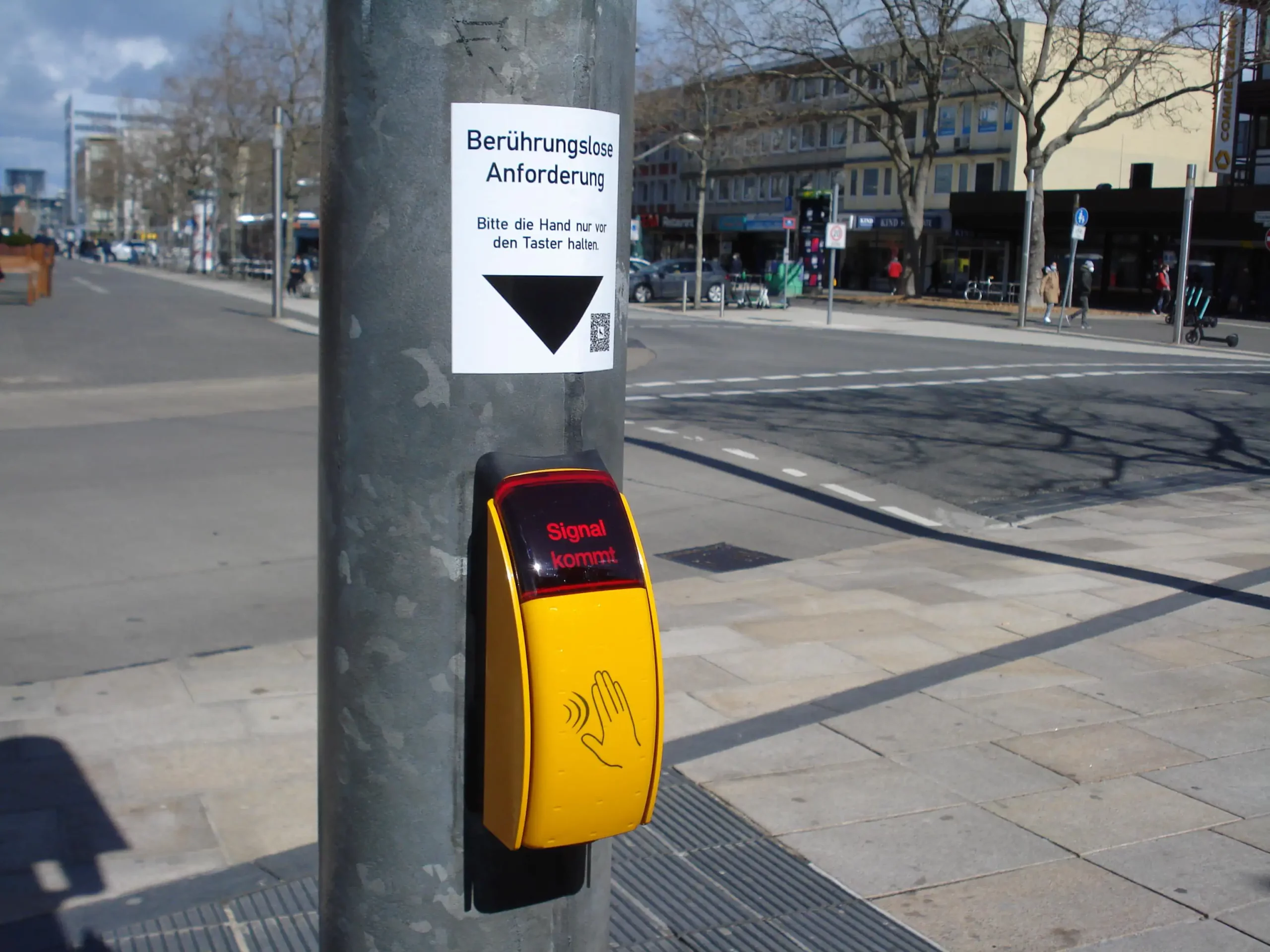
Conventional pedestrian buttons require touching, which could be uncomfortable in case of high volume of pedestrian flow at busy intersections. In addition, touching the same place again and again could be inappropriate for crowded public spaces. Furthermore, pedestrians who have bags, gloves, or pass through crowded places may find it less convenient to use traditional buttons. A touch-free interface can provide a more accessible and user-friendly way to request a crossing signal.
For smart-city planners, traffic system integrators, and pedestrian infrastructure providers, the Sinowatcher PedSense Push Button is a practical choice for modern pedestrian crossing systems. It uses contactless sensing to detect a hand from approximately 5–10 cm away, allowing users to activate a crossing request without touching the device. This touch-free operation provides convenient pedestrian interaction while supporting the integration of modern interfaces into intelligent traffic signal systems.
2. What Accessibility Features Make PedSense Push Button Practical?
Tactile and Audio Guidance for Different Users
Accessibility is another reason a PedSense Push Button can fit modern pedestrian infrastructure. Not all pedestrians use the same kind of information. For instance, visually impaired people rely on auditory and tactile feedback, while others require visual feedback. The device offers audio, visual, and tactile feedback and has an option to install a Braille plate for visually impaired users.
The use of several feedback systems makes the crossing interface more understandable. A pedestrian can approach the device, activate the request without pressing a surface, and then use the LED, audio, or tactile feedback to understand the crossing status. This reduces uncertainty and provides a more accessible interaction for different users.
Adaptive Volume for Changing Urban Environments
Urban noise is rarely constant. A quiet residential street, a school zone, and a major intersection can have very different acoustic conditions. A fixed-volume signal may be difficult to hear in heavy traffic but unnecessarily loud during quieter periods.
The PedSense Push Button uses adaptive volume adjustment to respond to surrounding noise conditions. Its product description also highlights optimized day-and-night operation, which can help balance audible guidance with the need to limit unnecessary noise during quieter hours. This type of configurable audio behavior is particularly relevant when pedestrian equipment is installed close to homes, schools, hospitals, or commercial areas.
3. What Design Features Make PedSense Push Button Reliable?
Weather-Resistant Construction for Outdoor Use
Pedestrian crossing equipment is installed outdoors and must continue operating despite exposure to rain, dust, temperature changes, and daily use. The PedSense Push Button uses a die-cast aluminum housing and has an IP55 protection rating, providing a defined level of protection against dust ingress and water jets.
Its listed operating temperature specification is presented as 30°C to +70°C on the product page, so project engineers should confirm the applicable temperature range with the supplier before final equipment selection. This is an important point for smart-city projects because environmental conditions vary considerably between locations. Mounting method, enclosure protection, local climate, and installation position should all be checked during system planning.
Low-Power Operation for Long-Term Applications
Energy consumption is another practical consideration when large numbers of electronic devices are deployed across a city. The PedSense Push Button is specified at no more than 8 W of power consumption, while AC 220 V is available as an input option. Although the exact energy impact depends on operating hours and installation conditions, a defined power rating allows engineers to include the device in the overall electrical design.
For example, if a device operated continuously at its maximum rated consumption of 8 W, its theoretical annual energy use would be about 70.1 kWh. Actual consumption can be lower depending on operating conditions and system configuration. This type of calculation is useful when planning electrical capacity, maintenance requirements, and operating costs across multiple intersections.
4. Conclusion
A PedSense Push Button supports smart-city pedestrian crossings with contactless activation, LED, acoustic, and tactile feedback, as well as adaptive audio for different urban environments. These features can make crossing requests more convenient, clear, and accessible for different users while providing a modern interface for intelligent traffic systems.
For traffic authorities, system integrators, and project planners, the PedSense Push Button also offers practical design features such as an IP55 enclosure, die-cast aluminum housing, configurable operation, and power consumption of up to 8 W. The final configuration should match local regulations and installation requirements. If you have any questions about the PedSense Push Button or its application, feel free to contact Sinowatcher for more information.
0
.webp)