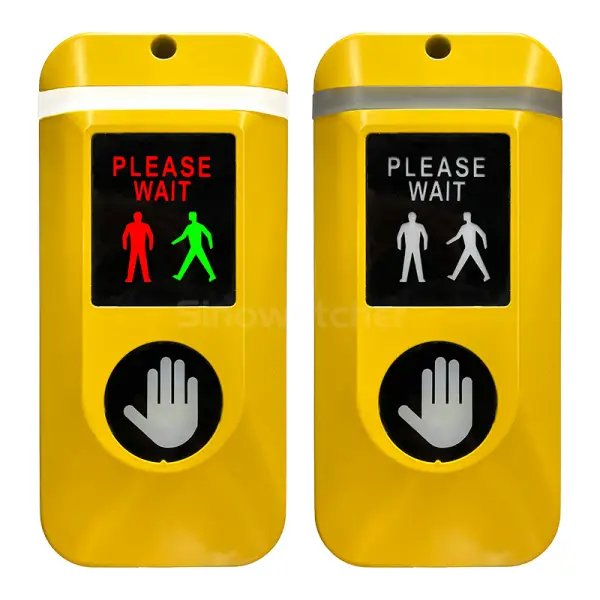
Old pedestrian push buttons need physical contact to send a signal to the traffic signal control system. The use of the smart city concept means that there are now more comfortable and user-friendly ways for pedestrians to communicate with crossing devices. The Contactless Pedestrian Push Button makes it possible for users to initiate a crossing request with a motion of their hand rather than by pushing the button.
It can be installed in modern intersections, school zones, public facilities, and smart transportation projects. Nevertheless, a contactless button is not only a sensor. Detection, feedback, environmental protection, and connectivity with traffic-control systems are its essential components as well. The knowledge about these components will help us to understand the use of a contactless button in pedestrian infrastructure better.
.webp)
1. Understanding a Contactless Pedestrian Push Button
A Touch-Free Device for Pedestrian Crossings
The Contactless Pedestrian Push Button is an electronic pedestrian request button that can detect the user’s intention with a motion of their hand without applying physical pressure to the device. After the request is detected, the device communicates with the pedestrian signal or traffic controller to activate the preprogrammed crossing sequence. Unlike an old mechanical button, the user doesn’t need to touch any moving button or press anything.
The primary function is still the same – to provide pedestrians with a way to ask for a crossing phase. The thing that changes is the way of initiating the request. A contactless interface can come in handy if the same crossing equipment will be used by hundreds or thousands of pedestrians, especially at busy intersections and public facilities. The interface can also be useful for pedestrians carrying something in their hands or wearing gloves.
How Contactless Detection Works
A contactless sensing system recognizes a hand when it enters a defined detection area. Instead of requiring physical pressure, the sensor detects the user’s movement and registers a crossing request when the hand reaches the activation range. This touch-free process makes pedestrian interaction simple and helps reduce the need to physically touch a shared surface. A typical operating sequence can be understood in four steps:
- The pedestrian approaches the crossing device.
- A hand enters the detection area.
- The sensor registers the crossing request.
- Visual, acoustic, or tactile feedback confirms the interaction.
The exact response depends on how the device is connected to the traffic-control system. Therefore, detection performance, feedback methods, and system compatibility should be considered together when planning a pedestrian crossing installation.
2. What Features Does a Contactless Pedestrian Push Button Have?
Contactless Activation for Easy Operation
The main feature of a Contactless Pedestrian Push Button is touch-free activation. Instead of applying physical force to a switch, users can activate the crossing request through proximity sensing. This provides a straightforward interaction method and can reduce unnecessary contact with public surfaces.
For high-traffic locations, this design can be particularly practical. Hundreds or thousands of pedestrians may use the same crossing equipment over a period of time, so the elimination of physical pressing each time may increase the convenience of the interface. This can also be helpful in cold weather if pedestrians wear gloves, as the sensing process does not require any direct contact with the skin.
LED, Audio, and Tactile Feedback
Activation is not sufficient. Once the request is made, pedestrians should have information about whether it was identified by the system or not. Modern contactless pedestrian push buttons should use several means of providing feedback so that pedestrians can find the process more understandable and intuitive.
| Feedback Type | Main Purpose |
| LED indicator | Confirms activation and provides visual information |
| Audio guidance | Communicates crossing-related information |
| Tactile feedback | Provides physical confirmation |
| Braille option | Supports users with visual impairments |
Using several communication channels can make a crossing interface more accessible and intuitive. Pedestrians who cannot see the indicator clearly can use the audio and/or tactile feedback, while other pedestrians can rely on the visual signal.
Adaptive Audio and Accessibility Options
The audio component of the accessible crossing interface becomes important, but urban noise can change from hour to hour. The presence of traffic, construction work, pedestrians, as well as nearby commercial activities, may impact the ability to hear the guidance through sound. In this respect, a Contactless Pedestrian Push Button with adaptive volume will help pedestrians get their audible instructions regardless of the surrounding noise level.
Accessibility may not necessarily mean the ability to receive instructions through sound. There is also the possibility of using such elements as LED indicators, tactile feedback, and braille components to facilitate pedestrian understanding of the system and communication. Using all these elements together, one can create a more inclusive and intuitive crossing interface.
3. Where Are Contactless Pedestrian Push Buttons Used?
Urban Intersections and Smart Traffic Systems
Intersection points in urban areas become an important application field for the Contactless Pedestrian Push Button. Pedestrians can activate the request for crossing without physically pressing the button, while LED and audio instructions will confirm the activation and help the pedestrians cross the street successfully. Therefore, the contactless control becomes perfect for use in such situations as busy intersections and smart pedestrian crossings.
For traffic authorities, system integrators, and smart city projects, the Sinowatcher PedSense Contactless Push Button is a practical choice. It combines contactless activation with LED, acoustic, and tactile feedback, while adaptive volume helps maintain clear audio guidance in different noise conditions. Its IP55-rated die-cast aluminum housing also supports outdoor use, making it suitable for long-term deployment in urban traffic and ITS projects.
.webp)
School Zones and High-Traffic Public Areas
A touch-free pedestrian interface is beneficial for school zones, transportation hubs, commercial areas, and other places where pedestrian traffic is constant. Those places usually have high pedestrian traffic and need a simple way of requesting a crossing. Hence, a Contactless Pedestrian Push Button can unite contactless activation with visual, audio, and tactile feedback.
It is essential to consider all requirements for the button when choosing one. The height and position of installation, compatibility with traffic controllers, power source, environmental conditions, and accessibility standards should be taken into account before implementing the device. The button should work properly within the complex crossing infrastructure in the context of smart pedestrian projects.
4. Conclusion
A contactless pedestrian push button can be described as a pedestrian crossing signal request devices that work by means of activation through proximity rather than actual pressing. Its merit is in its combination of touch-free operation with effective feedback and proper integration into pedestrian signal systems. Features such as 5–10 cm sensing range, LED illumination, acoustic signaling, tactile feedback, and volume adjustment can enhance its user-friendly character.
The correct choice of a Contactless Pedestrian Push Button is also important for city administration, traffic system integrators, and infrastructure project planners. Issues such as IP protection, power consumption, installation options, accessibility, and compatibility with traffic control are worth considering. Should you have any inquiries about the contactless Pedestrian Push Button or its use in pedestrian crossing installations, please contact Sinowatcher.
0