It’s not enough to get traffic safety equipment just because it offers a big sign. A radar speed sign with driver feedback is capable of detecting vehicle speed and providing real-time visual information to the driver, showing him his speed while he approaches the controlled area of the road. It may make a driver realize his mistakes and slow down. Different road situations require different traffic signs. The speed limit, traffic density, viewing distance, power supply, weather conditions, and installation location are only a few of those factors that can influence the work of the sign and should be known before buying it.
1. What Is a Radar Speed Sign with Driver Feedback?
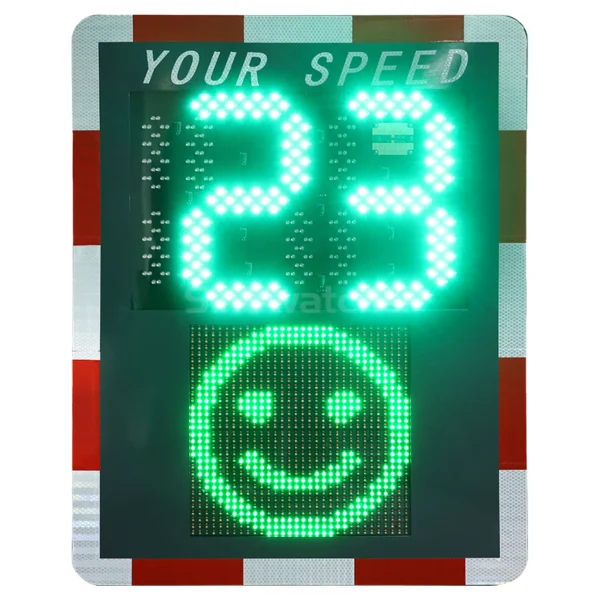
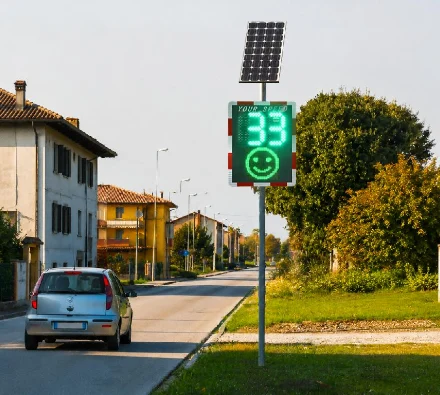
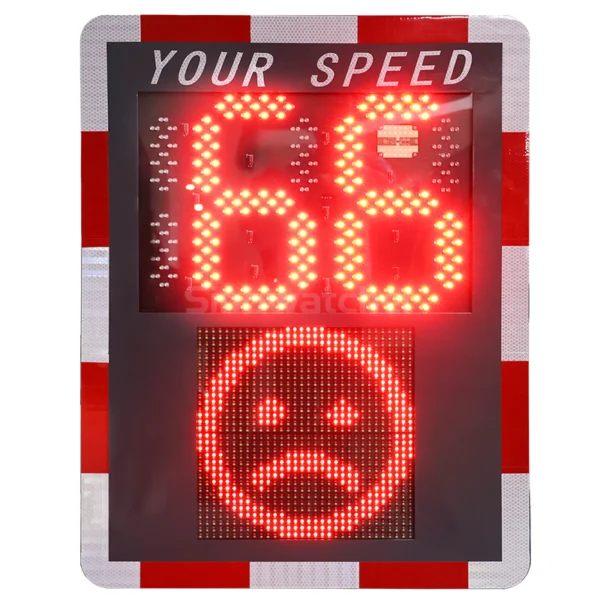
The radar speed sign with driver feedback is an electronic traffic sign that detects vehicle speed and shows the measured speed to the driver. This kind of traffic sign differs from a conventional speed-limit sign that provides only static information. A typical system consists of several main components:
- Radar sensor: Detects approaching vehicles and measures their speed.
- LED display: Shows the detected vehicle speed or warning information.
- Controller: Processes radar data and controls the display.
- Power supply: Provides electricity through AC power, batteries, solar energy, or other configurations.
- Mounting structure: Positions the equipment at an appropriate height and angle.
This enables the sign to give instantaneous feedback without having to involve the driver with the system itself.
How the Radar Speed Sign Detects Vehicle Speed
Radar detection works on the principle of sending out radio waves and analyzing the received waves to determine the speed of the approaching vehicle. This speed is transmitted to the speed display, where it will display the speed at which the driver is moving, and if programmed accordingly, it will send out a visual warning upon reaching the predetermined speed limit.
In choosing a radar speed sign with driver feedback, one needs to take into consideration the performance of the radar under realistic conditions on the roads, such as curves, intersections, lane width, other signs, and physical barriers, among others.
2. What Factors Should You Consider When Choosing a Radar Speed Sign with Driver Feedback?
Not every radar speed sign with driver feedback requires the same specifications. A sign installed near a school may have different requirements from one placed on a high-speed road. The following factors should be evaluated before making a purchase.
Display Size and Visibility
For a speed sign to be effective, it must be legible for drivers. Factors such as display size, LED intensity, character height, viewing angle, and contrast play a significant role in the visibility of the equipment. Daytime and nighttime performance need to be taken into account when choosing the equipment.
The required viewing distance should also influence the display configuration. For example, a sign intended to be read from several hundred feet away may require larger LED characters, while a sign installed on a slower residential street may not need the same display size.
Speed Detection Range and Accuracy
The detection range is related to how far away the system can detect the presence of a vehicle. It is important because the longer the detection range is, the earlier the drivers will be able to notice the speed at which they are driving and react accordingly. Accuracy is equally important, as inconsistent speed readings can reduce driver confidence in the displayed information.
For roads with different speed and detection requirements, the Sinowatcher’s Radar Speed Sign with Driver Feedback is a good choice. It offers a standard detection distance of 100 m, with 150 m and 200 m options available. It uses a 24.125 GHz Doppler radar and supports a detected speed range of 10–250 km/h, allowing the configuration to be matched to different road environments.
Driver Feedback Options
Various projects might need various feedback mechanisms. For instance, a simple method would just show the speed at which the vehicle is traveling, but an improved version could offer extra visual feedback if a driver goes beyond the permitted speed. In cases where the main concern is raising awareness among drivers, a visual feedback mechanism would suffice. Common feedback options include:
- Real-time speed display
- Flashing speed digits
- Warning messages
- Alternating speed and warning information
- Programmable speed thresholds
Speed Limit and Display Settings
A radar speed sign with driver feedback needs to comply with speed restrictions and display requirements for the installation site. Thus, one may expect a speed restriction of 25 mph in one location, while the other road would need 35, 45, and 55 mph speed restrictions. Consequently, the device must have a relevant speed range with a configurable warning threshold. Before purchasing, confirm whether the sign supports:
- Required speed limit settings
- mph or km/h display
- Adjustable warning thresholds
- Programmable display behavior
- Day and night brightness settings
Power Supply and Energy Efficiency
Another important issue is power supply. Depending on the installation location, a radar speed sign with driver feedback may use either grid power, batteries, solar power, or any combination of the above power supplies. In case no convenient electrical network is available at the installation site, a solar-based system becomes quite handy. The problem is that a sufficient amount of power should be supplied by the solar panels and batteries. When evaluating a solar-powered system, consider factors such as:
- Daily operating hours
- Local sunlight conditions
- Battery capacity
- LED power consumption
- Seasonal weather conditions
Weather Resistance and Durability
Outdoor traffic equipment should be able to withstand rain, dust, sun, temperature variations, among other environmental factors. Therefore, when choosing a radar speed sign with driver feedback, you need to ensure that the unit is durable enough to withstand the outdoor environment for a long period of time.
Additionally, the mounting structure should be able to withstand changing weather and wind conditions. In the case of an area with a lot of sun exposure, it is necessary to choose a radar speed sign that has some sort of UV resistance, whereas areas prone to rain or dust will require protection from the enclosure.
3. How Should You Match a Radar Speed Sign with Driver Feedback to the Road?
The configuration of the sign should be determined by the nature of the road. This means that a radar speed sign with driver feedback placed on a residential street does not need the same configuration as those placed on high-speed roads.
Residential and School Zones
The primary emphasis in residential streets and school zones is on driver alertness and the safety of pedestrians, with speed limits being in the range of 20–35 mph, depending on local laws. The ideal sign would inform people about the speed while avoiding visual clutter in the area, thus making legibility and easy-to-understand driver feedback essential for such an environment.
Another key aspect is positioning. The sign must be placed where drivers will have enough time to know the current speed of their vehicle and to slow down before coming to the school entrance or a pedestrian crossing. Visibility may be especially helpful during arrivals and departures at schools, when pedestrian traffic becomes more intense.
Urban Roads and Intersections
Urban roads may have more complicated traffic situations with multiple lanes, parked vehicles, traffic lights, pedestrians, and other traffic signs on the side of the road. Here, radar position is important. The detection field has to be as clear as possible, and the display has to be installed in a place from where drivers can read it without competing too much with other traffic information.
Radar Speed Signs with Driver Feedback have to be chosen depending on the road width and traffic direction. In case of multiple lanes, the detection field has to be relevant to the lanes, and the display has to be visible enough for the approaching vehicles.
High-Speed Roads and Open Areas
Higher-speed roads have to pay more attention to the detection distance and visibility of the display. Driving at 55 mph, the vehicle covers 81 feet per second. Thus, drivers have considerably less reaction time for roadside information than at 25 and 30 mph. For these locations, consider a system with:
- Sufficient radar detection distance
- High-visibility LED display
- Strong daytime brightness
- Appropriate display size
- Weather-resistant construction
- Reliable power supply
The mounting height and roadside position should also provide a clear detection path while keeping the display within the driver’s normal field of view.
4. Conclusion
Selection of an appropriate speed sign with driver feedback is influenced by the road setting, speed limit, traffic flow, viewing distance, power source, and installation needs. The ideal product should offer accuracy of speed detection, good visibility, driver feedback, and durability to be able to operate outdoors.
An appropriate speed sign will assist the driver to understand his or her speed and drive more responsibly. If you require guidance in selecting an ideal product for your work, contact us at Sinowatcher with information about your road, speed limit, traffic volume, and installation conditions.
0